

Real Executor at a Glance
Everything about the current build on one screen — jump straight to a section, check the hard facts, or meet the developer behind the project.
| Software | Real Executor (Project Real) — Roblox Luau script executor |
|---|---|
| Current version | v1.7.3b · stable build |
| Released | October 15, 2026 |
| Platform | Windows 10 / 11 · 64-bit only |
| Installer size | 8.7 MB (real_setup_1.7.3b.exe) |
| Price | Free — no key system, no paid tier |
| Requirements | Roblox client, VC++ 2015–2022 (x64), 4 GB RAM, 200 MB disk |
| Support | Discord community |
| Language | English |
What Is the Real Executor?
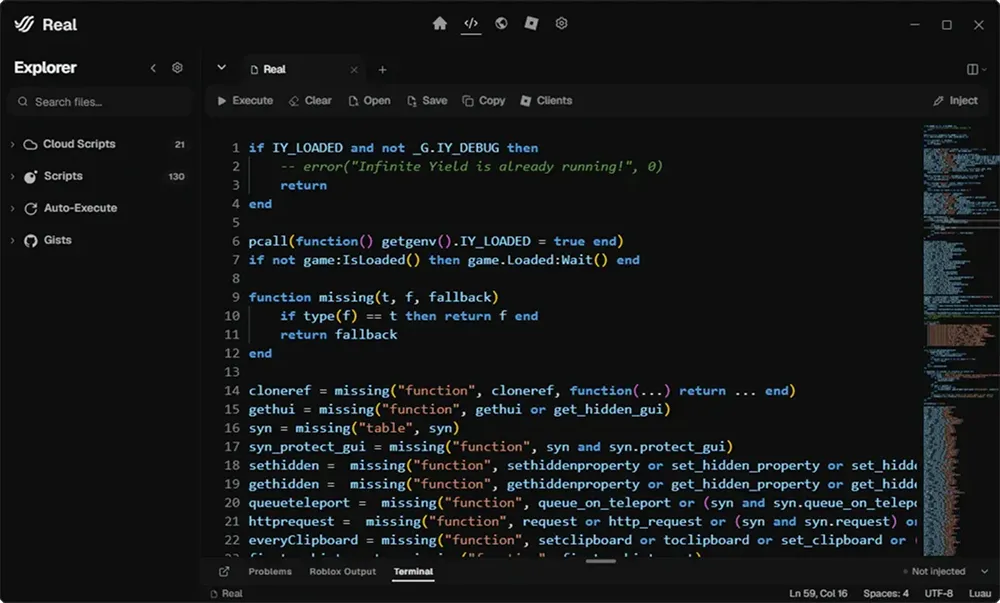
Real Executor is a Roblox script executor — a Windows tool that runs Luau code inside a running Roblox experience. You join a game, press Attach, and the executor hooks its own native Luau virtual machine into the client. From that moment any script you paste, drop or pick from the hub behaves as if the game itself were running it: closures, coroutines and metatables all work the way Roblox intends them to, because the runtime speaks the same dialect natively instead of translating it.
Unlike most free executors, there is no key system between you and the editor — no linkvertise chains, no daily checkpoints, no “complete 3 offers” walls. The whole loop is: download the installer, open the launcher, attach, execute. That simplicity is the product, not a side effect: every build is tested against the 2,400+ biggest experiences before it ships, and the script hub is refreshed weekly so the library you browse actually matches the games people play today.
Who is it for? Players who want farm loops, ESP overlays and quality-of-life scripts for games like Blox Fruits or Blade Ball; scripters who want a proper Monaco editor with Luau syntax highlighting instead of a Notepad pane; and anyone who has been burned by a fake executor before and just wants the clean, keyless original from the official domain — project-real.net.
How execution works
What Project Real Does Well
Every corner of Project Real was built around one idea — scripts should run the moment you press the button, not after a tour through installers, keys and verification links. The feature set below is what makes that possible day to day.
Native Luau Runtime
A ground-up Luau 5.1 virtual machine sits at the core of the Real Executor, so your scripts run against the same type model and metatable semantics Roblox uses internally. No wrapper layer, no translation step — closures, coroutines and tables behave exactly the way you expect.
Sub-Second Attach
Hook into a running Roblox client in roughly 420 milliseconds. One click, one green dot — then the editor is yours.
Keyless Access
No linkvertise, no checkpoints, no daily keys. Download the app, open it, done — the launcher is the key.
Cloud Script Library
Curated hub updated weekly — browse by experience, pin favourites, run with one click. Your save slots sync between machines.
Built-In Editor
Monaco-based code pane with Luau syntax highlighting, bracket matching, tabs and autosave. Write, test and ship without leaving the window.
Multi-Instance Ready
Open as many Roblox clients as your rig can handle and attach to each one independently. Scripts, settings and consoles stay isolated per instance.
Auto-Execute
Drop a .lua file into the autoexec folder and the runtime fires it the moment the client finishes loading. Perfect for farm scripts and persistent UIs.
Hardened Pipeline
The injector keeps every attach in its own sandboxed process. Clean separation means a crash in one script never takes the whole workspace down with it.
Experiences We Cover
Project Real is tested against the biggest Roblox experiences every single update cycle. If a game ships a new engine version on Tuesday, the script library and runtime are patched by the time most players sit down to play on Wednesday.
Full farm loop, teleport to islands, auto-raid and quest completion with a single toggle.
Auto-hatch, auto-collect and chest-tracker scripts that follow the latest world rotations.
Auto-parry with adjustable reaction window, visual trajectory lines and velocity read-outs.
Entity notifier, chest and item ESP, room skip and door prediction overlays.
Auto-plant, auto-harvest and seed-shop watcher. Weather-event notifier included.
Silent aim toggle, player ESP, prediction and FOV ring with per-weapon tuning.
Role reveal, coin collector, gun pickup helper and sheriff-tracker toggle.
Aimbot with team check, fast-fists, bring-player and auto-rejoin on server kick.
Running Your First Script
Four short steps between downloading the installer and seeing a Luau script run inside your Roblox session. The launcher walks you through the first launch and remembers your layout from there.
Grab the Installer
Open the download page and save the installer. The file is served directly — no mirrors, no ad walls between you and it.
Open the Launcher
Launch Project Real. It verifies integrity, pulls the latest Luau profile and sits in the tray until you need it.
Attach to Roblox
Join any experience, come back to the launcher and press Attach. The green indicator means execution is live.
Paste & Execute
Open a script from the library or paste your own into the editor, then hit Execute. That is the whole loop.
Changelog
Every build is written up here — new library additions, API extensions, bug fixes, deprecations and anything that touches how your scripts run.
hookmetamethod on userdata without a backing __index metatable
blx frts still finds the Blox Fruits bundle
getrawmetatable, setreadonly and getupvalues to the exposed API surface
Execution Modes
Project Real ships four distinct ways to run a script, so a quick test script and a background farm script don't share the same workflow. Each Real Executor mode is tuned around a different use case and keeps its own log stream.
The default one-shot workflow. Paste code, press Execute, read the output. Zero config, zero flags — ideal for testing, debugging a snippet or launching anything from the library on demand.
Drop a .lua file into the autoexec folder and the Real Executor injects it the moment the Roblox client finishes loading its first place. Great for persistent UIs, farm scripts and anything you don't want to re-arm every session.
Pin a script to a configurable interval and let the Real Executor fire it on a timer — anywhere from once a second to once an hour. Useful for health watchers, drop checkers and anything that benefits from a steady re-trigger.
Spin the script up inside an isolated Luau state — its own globals, its own environment, no reach into shared memory. First place I go when I'm trying out a Real Executor script I haven't vetted.
Is Real Executor Safe?
The honest answer, without the marketing voice: the binary itself is clean, but any Roblox executor will always carry two separate risks you should understand before you download anything.
Why antivirus flags it
Real Executor injects a Luau VM into another process — behaviour that is byte-for-byte identical to what malware does, so heuristic engines flag it on sight. It is a false positive, not a detection: every build is compiled fresh, contains no adware bundles, no miners and no telemetry, and each attach runs in its own sandboxed process. Don't disable your AV — just add an exclusion for the install folder.
The Roblox account risk
Roblox's Terms of Service forbid third-party clients — full stop. No executor, paid or free, can promise you will never be banned. The practical advice the community actually follows: run scripts on an alt account, keep the executor updated the morning after a Roblox engine bump, and treat hub scripts flagged unstable as unstable.
How to spot a fake Real Executor download
real_setup_1.7.3b.exe, 8.7 MB. A wildly different size or a .scr/.zip wrapper means walk away.Real Executor: Pros & Cons
No tool is all upside. Here is what three release cycles of community feedback actually praise — and what it still gets dinged for.
Real Executor vs the Alternatives
People shopping for an executor usually compare the same three names. Here is how the current builds stack up — judged on the things that decide your day-to-day: keys, attach, updates and editor.
Delta is the best-known name and its mobile builds are genuinely popular. But the Windows pipeline leans on a key system with checkpoint links, and attach times drift well past a second after engine bumps. Real Executor skips the key entirely and holds ~420 ms attach on the same updates — if you are desktop-only, that difference is the whole story.
Codex updates fast and its API surface is solid for scripters. The trade-off is stability windows — between Roblox engine bumps, attach failures cluster until a hotfix lands, and the editor is functional rather than pleasant. Real Executor ships the same class of API with a Monaco editor and a 99.8% attach rate across the same cycle.
Wave markets a slick UI, and it looks the part. Under the hood the free tier is rate-limited and pushes most useful scripts behind a paid plan, with a loader that phones home on every launch. Real Executor has no tiers at all — every feature, including the full cloud hub and multi-instance, is free with no telemetry beyond update checks.
What Players Say
Every rating below comes from the community — collected on Discord, Reddit and the in-app feedback form over the last three release cycles. Rate the executor yourself at the bottom of the summary.
Switched over from a paid executor last month and honestly haven't gone back. Attach is faster, the hub actually has what I need and nothing nags me for a key.
Parry timing script in the hub actually works. I bumped the reaction window to 60ms and it held up through a whole tournament bracket.
Loop Execute at a 2s interval has been running my hatch script every evening for weeks. Zero crashes, zero intervention needed.
Entity ESP from the official hub updates faster than every community fork I've tried. Rush and Ambush show up before anyone in VC can call them.
The editor is actually usable — I write my own loops instead of pasting random Pastebin links. Monaco autocomplete goes a long way.
I leave this running overnight on three accounts with multi-instance. The app juggles them without the fans even spinning up.
I was skeptical because of all the bad executors out there. Been using the Real Executor for three months now, zero crashes, hub updates on time.
Role reveal and coin collector run together without stuttering. Haven't crashed once in 40 or so rounds. UI is tidy too.
hookmetamethod and getrawmetatable both behave exactly like you'd expect. I port my own code from a few other runtimes and it just works here.
First time I've used anything like this and it was two minutes from download to a working script. The launcher walks you through it clearly.
Troubleshooting
Short answers for the handful of things that trip people up most often. These are the exact fixes support points people at every week.
Click More info on the SmartScreen banner, then Run anyway. SmartScreen flags every unsigned installer by reputation — fresh builds need a few thousand downloads before Microsoft's rep service clears them.
Add the install folder to Defender's exclusion list before re-downloading. Any binary that patches into a running process gets flagged by generic heuristics — it is a false positive, but you need to tell Defender that explicitly.
Settings → Privacy & security → Windows Security → Virus & threat protection → Manage settings → Add or remove exclusions.
The Real Executor requires the latest Microsoft Visual C++ redistributable (x64, 2015-2022). Install it from Microsoft's download page and restart. The window should stay up after that.
The installer only writes a Start Menu entry by default. Search for Project Real in the Start Menu, right-click, pin to Start or send to Desktop as a shortcut.
A grey attach button means the launcher cannot see a running Roblox client. Make sure a game has fully loaded (character spawned, UI visible) before pressing Attach. Rejoining a server through the in-game portal sometimes needs one extra second — give it a moment.
Check the output pane at the bottom of the editor. Nine times out of ten there is a syntax error or a missing variable the script is referencing. If the pane is clean, try the same script in Sandboxed Run — a crashed loop in Quick Run can leave the executor without a free Luau state.
Multi-instance mode has to be toggled on in Settings. Open the launcher, head to Preferences → Runtime → Multi-instance and tick the box. Each attached client gets its own tab after that.
Usually a server-change issue — the script hooked into an object that no longer exists after the player teleports. Wrap sensitive calls in pcall or move them under a game.Loaded listener. The library versions in the hub already do this.
The game you joined received a backend update that broke the current script's assumptions. Rebuilt versions typically land within 24-48 hours. The hub shows a yellow dot next to scripts that are in the queue.
If you have been running Loop Execute for several hours, open the editor's run history and click Clear logs. The log store grows per-run and holds reference to the script's locals — clearing it lets Luau free them.
Questions, Answered
The handful of questions that come up on the Project Real support channel most weeks — bundled here so you don't have to go looking.
Is the Project Real app free?
Yes. There is no paid tier, no gated features, no key system. The whole thing is free to download and use — the only ask is you grab it from project-real.net rather than a third-party mirror.
Does it work on Mac or on mobile?
Right now the Real Executor is Windows-only (10 and 11, both x64). A macOS build is on the roadmap but there is no firm date — the Luau runtime is portable, the injection layer is not.
Do I need to disable antivirus?
Not disable — exclude. Add the Project Real install folder to your antivirus exclusion list and keep real-time protection on for everything else. Any binary that touches another process gets flagged by heuristics; it is a false positive but you have to tell AV that.
Will I get banned using this?
Roblox's own ToS forbids third-party clients, so there is always risk when you use any Roblox executor. Use an alt account for anything you are not willing to lose, keep the Real Executor updated, and treat anything the hub flags as unstable as unstable.
How often does the Project Real app update?
Patch builds of the Real Executor land roughly every two to three weeks and whenever Roblox pushes a client-engine bump. Script hub content refreshes on a weekly cycle. The launcher checks for updates on launch and installs them silently.
Which Luau globals are exposed?
The full standard set plus the common extras — hookfunction, hookmetamethod, getrawmetatable, setreadonly, getupvalues, getgc and the drawing library. The in-app documentation lists the exact API map for the current build.
Can I use my own scripts, not just the hub?
Of course. Paste anything into the Real Executor editor, drag a .lua file into the window, or drop it in the autoexec folder. The hub is a convenience, not a wall.
Is there a Discord or support channel?
Yes — a link lives in the launcher under Help → Community. The team watches the #support channel directly and the #script-requests channel feeds into what the hub picks up next.
Leave a Comment
Shipped a script, survived a ban wave, or found a bug the changelog missed? Tell other players how the Real Executor is working for you. Comments are reviewed before they go live — no spam, no fake-download links.